> ## Documentation Index
> Fetch the complete documentation index at: https://docs.runpod.io/llms.txt
> Use this file to discover all available pages before exploring further.
# Send API requests
> Submit and manage jobs for your queue-based endpoints by sending HTTP requests.
export const LoadBalancingEndpointTooltip = () => {
return load balancing endpoint;
};
export const QueueBasedEndpointsTooltip = () => {
return queue-based endpoints;
};
After creating a [Serverless endpoint](/serverless/endpoints/overview), you can start sending HTTP requests to submit jobs and retrieve results:
```sh theme={"theme":{"light":"github-light","dark":"github-dark"}}
curl -x POST https://api.runpod.ai/v2/ENDPOINT_ID/runsync \
-H "authorization: Bearer RUNPOD_API_KEY" \
-H "content-type: application/json" \
-d '{ "input": { "prompt": "Hello, world!" }}'
```
This guide is for . If you're building a , the request structure and endpoints depend on how you define your HTTP servers.
## How requests work
A **job** is a unit of work containing the input data from the request, packaged for processing by your [workers](/serverless/workers/overview). If no worker is immediately available, the job is queued. Once a worker is available, the job is processed using your worker's [handler function](/serverless/workers/handler-functions).
## Sync vs. async
* `/runsync` submits a **synchronous** job.
* Client waits for the job to complete before returning the result.
* Results are available for 1 minute (5 minutes max).
* Ideal for quick responses and interactive applications.
* `/run` submits an **asynchronous** job.
* The job processes in the background; retrieve results via `/status`.
* Results are available for 30 minutes after completion.
* Ideal for long-running tasks and batch processing.
## Request input structure
When submitting a job with `/runsync` or `/run`, your request must include a JSON object with the key `input` containing the parameters required by your worker's [handler function](/serverless/workers/handler-functions):
```json theme={"theme":{"light":"github-light","dark":"github-dark"}}
{
"input": {
"prompt": "Your input here"
}
}
```
The exact parameters depend on your specific worker implementation. Check your worker's documentation for required and optional parameters.
## Send requests from the console
The quickest way to test your endpoint is in the Runpod console. Navigate to [Serverless](https://www.console.runpod.io/serverless), select your endpoint, and click the **Requests** tab.
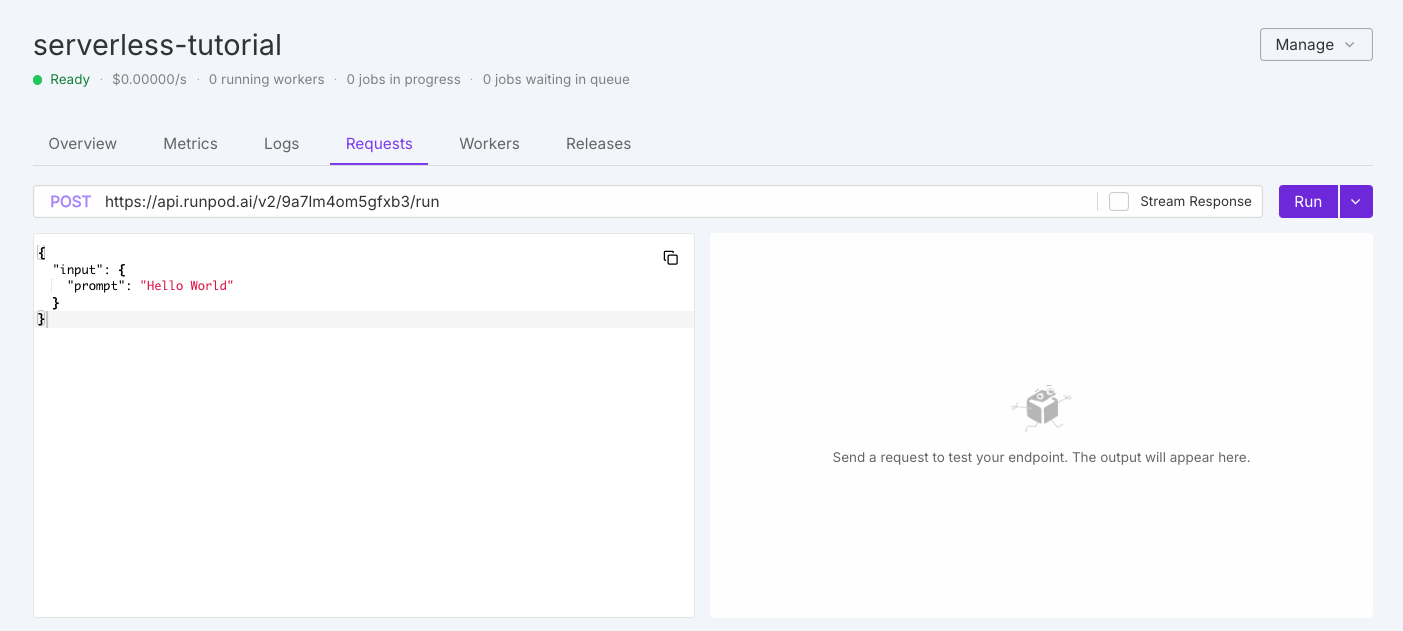 Modify the default test request as needed, then click **Run**. On first execution, workers need to initialize, which may take a moment.
## Operation overview
Queue-based endpoints support these operations for job lifecycle management:
| Operation | Method | Description |
| -------------- | ------ | ----------------------------------------------------------------- |
| `/runsync` | POST | Submit a synchronous job and wait for complete results. |
| `/run` | POST | Submit an asynchronous job that processes in the background. |
| `/status` | GET | Check status, execution details, and results of a submitted job. |
| `/stream` | GET | Receive incremental results as they become available. |
| `/cancel` | POST | Stop a job in progress or waiting in the queue. |
| `/retry` | POST | Requeue a failed or timed-out job with the same job ID and input. |
| `/purge-queue` | POST | Clear all pending jobs from the queue. |
| `/health` | GET | Monitor endpoint status, including worker and job statistics. |
See the [operation reference](/serverless/endpoints/operation-reference) for detailed examples using cURL and the Runpod SDK.
For custom API paths, use [load balancing endpoints](/serverless/load-balancing/overview).
## Advanced options
Beyond the required `input` object, you can include optional top-level parameters for additional functionality.
### Webhook notifications
Receive notifications when jobs complete by specifying a webhook URL:
```json theme={"theme":{"light":"github-light","dark":"github-dark"}}
{
"input": { "prompt": "Your input here" },
"webhook": "https://your-webhook-url.com"
}
```
Your webhook should return a `200` status code. If the call fails, Runpod retries up to 2 more times with a 10-second delay.
### Execution policies
Control job execution behavior with custom policies:
```json theme={"theme":{"light":"github-light","dark":"github-dark"}}
{
"input": { "prompt": "Your input here" },
"policy": {
"executionTimeout": 900000,
"lowPriority": false,
"ttl": 3600000
}
}
```
| Option | Description | Default | Constraints |
| ------------------ | ------------------------------------------------ | ------------------- | ---------------------- |
| `executionTimeout` | Maximum time a job can run while being processed | 600000 (10 minutes) | Min 5 sec, max 7 days |
| `lowPriority` | When true, job won't trigger worker scaling | false | - |
| `ttl` | Total lifespan of the job before deletion | 86400000 (24 hours) | Min 10 sec, max 7 days |
Setting `executionTimeout` in a request overrides the default endpoint setting for that specific job only.
#### TTL vs. execution timeout
* **`ttl`**: Total lifespan of the job. Timer starts when submitted and covers queue time, execution time, and everything in between. When TTL expires, the job is deleted regardless of state.
* **`executionTimeout`**: Maximum time the job can actively run once a worker picks it up. Only enforced during execution.
TTL is a hard limit. If TTL expires while a job is running, the job is immediately removed and status checks return 404, even if the job would have completed successfully.
#### Long-running jobs
For jobs that need to run longer than the default 24-hour TTL:
1. Set `executionTimeout` to your desired maximum runtime.
2. Set `ttl` to cover **both expected queue time and execution time**.
```json theme={"theme":{"light":"github-light","dark":"github-dark"}}
{
"input": { "prompt": "Long running task" },
"policy": {
"executionTimeout": 172800000,
"ttl": 259200000
}
}
```
This allows up to 48 hours of active runtime with 72 hours total lifespan (24 hours headroom for queue time).
Both `ttl` and `executionTimeout` have a maximum of 7 days. A job with 7-day TTL that queues for 2 days only has 5 days remaining for execution.
#### Result retention
After completion, results are retained for a fixed period separate from TTL:
| Request type | Retention period |
| ----------------- | ---------------- |
| `/run` (async) | 30 minutes |
| `/runsync` (sync) | 1 minute |
### S3-compatible storage
Configure S3-compatible storage for endpoints working with large files:
```json theme={"theme":{"light":"github-light","dark":"github-dark"}}
{
"input": { "prompt": "Your input here" },
"s3Config": {
"accessId": "BUCKET_ACCESS_KEY_ID",
"accessSecret": "BUCKET_SECRET_ACCESS_KEY",
"bucketName": "BUCKET_NAME",
"endpointUrl": "BUCKET_ENDPOINT_URL"
}
}
```
Your worker must contain logic to use this information for storage operations. Works with any S3-compatible provider including MinIO, Backblaze B2, and DigitalOcean Spaces.
## Rate limits
Runpod enforces rate limits per endpoint and operation:
| Operation | Method | Rate Limit | Concurrent Limit |
| -------------- | ------ | ---------------------------- | ---------------- |
| `/runsync` | POST | 2000 requests per 10 seconds | 400 concurrent |
| `/run` | POST | 1000 requests per 10 seconds | 200 concurrent |
| `/status` | GET | 2000 requests per 10 seconds | 400 concurrent |
| `/stream` | GET | 2000 requests per 10 seconds | 400 concurrent |
| `/cancel` | POST | 100 requests per 10 seconds | 20 concurrent |
| `/purge-queue` | POST | 2 requests per 10 seconds | N/A |
| `/openai/*` | POST | 2000 requests per 10 seconds | 400 concurrent |
| `/requests` | GET | 10 requests per 10 seconds | 2 concurrent |
### Dynamic rate limiting
Rate limits scale with your endpoint's worker count. The system uses whichever is higher between:
1. **Base limit**: Fixed rate limit per user per endpoint (shown above)
2. **Worker-based limit**: `number_of_running_workers × requests_per_worker`
Requests exceeding the effective limit return `429 (Too Many Requests)`. Implement retry logic with exponential backoff to handle rate limiting gracefully.
## Error handling
Common errors and solutions:
| HTTP Status | Meaning | Solution |
| ----------- | --------------------- | ------------------------------------------------- |
| 400 | Bad Request | Check your request format and parameters |
| 401 | Unauthorized | Verify your API key is correct and has permission |
| 404 | Not Found | Check your endpoint ID |
| 429 | Too Many Requests | Implement backoff and retry logic |
| 500 | Internal Server Error | Check endpoint logs; worker may have crashed |
| Issue | Possible Causes | Solutions |
| ------------------ | ----------------------------------------- | ----------------------------------------------------------------- |
| Job stuck in queue | No available workers, max workers reached | Increase max workers, check endpoint health |
| Timeout errors | Job takes longer than execution timeout | Increase timeout in job policy, optimize processing |
| Failed jobs | Worker errors, input validation issues | Check [endpoint logs](/serverless/development/logs), verify input |
| Missing results | Results expired | Retrieve within expiration window (30 min async, 1 min sync) |
See [error handling](/serverless/workers/handler-functions#error-handling) for implementation details.
Modify the default test request as needed, then click **Run**. On first execution, workers need to initialize, which may take a moment.
## Operation overview
Queue-based endpoints support these operations for job lifecycle management:
| Operation | Method | Description |
| -------------- | ------ | ----------------------------------------------------------------- |
| `/runsync` | POST | Submit a synchronous job and wait for complete results. |
| `/run` | POST | Submit an asynchronous job that processes in the background. |
| `/status` | GET | Check status, execution details, and results of a submitted job. |
| `/stream` | GET | Receive incremental results as they become available. |
| `/cancel` | POST | Stop a job in progress or waiting in the queue. |
| `/retry` | POST | Requeue a failed or timed-out job with the same job ID and input. |
| `/purge-queue` | POST | Clear all pending jobs from the queue. |
| `/health` | GET | Monitor endpoint status, including worker and job statistics. |
See the [operation reference](/serverless/endpoints/operation-reference) for detailed examples using cURL and the Runpod SDK.
For custom API paths, use [load balancing endpoints](/serverless/load-balancing/overview).
## Advanced options
Beyond the required `input` object, you can include optional top-level parameters for additional functionality.
### Webhook notifications
Receive notifications when jobs complete by specifying a webhook URL:
```json theme={"theme":{"light":"github-light","dark":"github-dark"}}
{
"input": { "prompt": "Your input here" },
"webhook": "https://your-webhook-url.com"
}
```
Your webhook should return a `200` status code. If the call fails, Runpod retries up to 2 more times with a 10-second delay.
### Execution policies
Control job execution behavior with custom policies:
```json theme={"theme":{"light":"github-light","dark":"github-dark"}}
{
"input": { "prompt": "Your input here" },
"policy": {
"executionTimeout": 900000,
"lowPriority": false,
"ttl": 3600000
}
}
```
| Option | Description | Default | Constraints |
| ------------------ | ------------------------------------------------ | ------------------- | ---------------------- |
| `executionTimeout` | Maximum time a job can run while being processed | 600000 (10 minutes) | Min 5 sec, max 7 days |
| `lowPriority` | When true, job won't trigger worker scaling | false | - |
| `ttl` | Total lifespan of the job before deletion | 86400000 (24 hours) | Min 10 sec, max 7 days |
Setting `executionTimeout` in a request overrides the default endpoint setting for that specific job only.
#### TTL vs. execution timeout
* **`ttl`**: Total lifespan of the job. Timer starts when submitted and covers queue time, execution time, and everything in between. When TTL expires, the job is deleted regardless of state.
* **`executionTimeout`**: Maximum time the job can actively run once a worker picks it up. Only enforced during execution.
TTL is a hard limit. If TTL expires while a job is running, the job is immediately removed and status checks return 404, even if the job would have completed successfully.
#### Long-running jobs
For jobs that need to run longer than the default 24-hour TTL:
1. Set `executionTimeout` to your desired maximum runtime.
2. Set `ttl` to cover **both expected queue time and execution time**.
```json theme={"theme":{"light":"github-light","dark":"github-dark"}}
{
"input": { "prompt": "Long running task" },
"policy": {
"executionTimeout": 172800000,
"ttl": 259200000
}
}
```
This allows up to 48 hours of active runtime with 72 hours total lifespan (24 hours headroom for queue time).
Both `ttl` and `executionTimeout` have a maximum of 7 days. A job with 7-day TTL that queues for 2 days only has 5 days remaining for execution.
#### Result retention
After completion, results are retained for a fixed period separate from TTL:
| Request type | Retention period |
| ----------------- | ---------------- |
| `/run` (async) | 30 minutes |
| `/runsync` (sync) | 1 minute |
### S3-compatible storage
Configure S3-compatible storage for endpoints working with large files:
```json theme={"theme":{"light":"github-light","dark":"github-dark"}}
{
"input": { "prompt": "Your input here" },
"s3Config": {
"accessId": "BUCKET_ACCESS_KEY_ID",
"accessSecret": "BUCKET_SECRET_ACCESS_KEY",
"bucketName": "BUCKET_NAME",
"endpointUrl": "BUCKET_ENDPOINT_URL"
}
}
```
Your worker must contain logic to use this information for storage operations. Works with any S3-compatible provider including MinIO, Backblaze B2, and DigitalOcean Spaces.
## Rate limits
Runpod enforces rate limits per endpoint and operation:
| Operation | Method | Rate Limit | Concurrent Limit |
| -------------- | ------ | ---------------------------- | ---------------- |
| `/runsync` | POST | 2000 requests per 10 seconds | 400 concurrent |
| `/run` | POST | 1000 requests per 10 seconds | 200 concurrent |
| `/status` | GET | 2000 requests per 10 seconds | 400 concurrent |
| `/stream` | GET | 2000 requests per 10 seconds | 400 concurrent |
| `/cancel` | POST | 100 requests per 10 seconds | 20 concurrent |
| `/purge-queue` | POST | 2 requests per 10 seconds | N/A |
| `/openai/*` | POST | 2000 requests per 10 seconds | 400 concurrent |
| `/requests` | GET | 10 requests per 10 seconds | 2 concurrent |
### Dynamic rate limiting
Rate limits scale with your endpoint's worker count. The system uses whichever is higher between:
1. **Base limit**: Fixed rate limit per user per endpoint (shown above)
2. **Worker-based limit**: `number_of_running_workers × requests_per_worker`
Requests exceeding the effective limit return `429 (Too Many Requests)`. Implement retry logic with exponential backoff to handle rate limiting gracefully.
## Error handling
Common errors and solutions:
| HTTP Status | Meaning | Solution |
| ----------- | --------------------- | ------------------------------------------------- |
| 400 | Bad Request | Check your request format and parameters |
| 401 | Unauthorized | Verify your API key is correct and has permission |
| 404 | Not Found | Check your endpoint ID |
| 429 | Too Many Requests | Implement backoff and retry logic |
| 500 | Internal Server Error | Check endpoint logs; worker may have crashed |
| Issue | Possible Causes | Solutions |
| ------------------ | ----------------------------------------- | ----------------------------------------------------------------- |
| Job stuck in queue | No available workers, max workers reached | Increase max workers, check endpoint health |
| Timeout errors | Job takes longer than execution timeout | Increase timeout in job policy, optimize processing |
| Failed jobs | Worker errors, input validation issues | Check [endpoint logs](/serverless/development/logs), verify input |
| Missing results | Results expired | Retrieve within expiration window (30 min async, 1 min sync) |
See [error handling](/serverless/workers/handler-functions#error-handling) for implementation details.