> ## Documentation Index
> Fetch the complete documentation index at: https://docs.runpod.io/llms.txt
> Use this file to discover all available pages before exploring further.
# Runpod Hub publishing guide
> Publish your repositories to the Runpod Hub.
Learn how to publish your repositories to the [Runpod Hub](https://www.runpod.io/console/hub), including how to configure your repository with the required `hub.json` and `tests.json` files.
After you publish your repository to the Hub, you can start [earning revenue](/hub/revenue-sharing) from your users' compute usage.
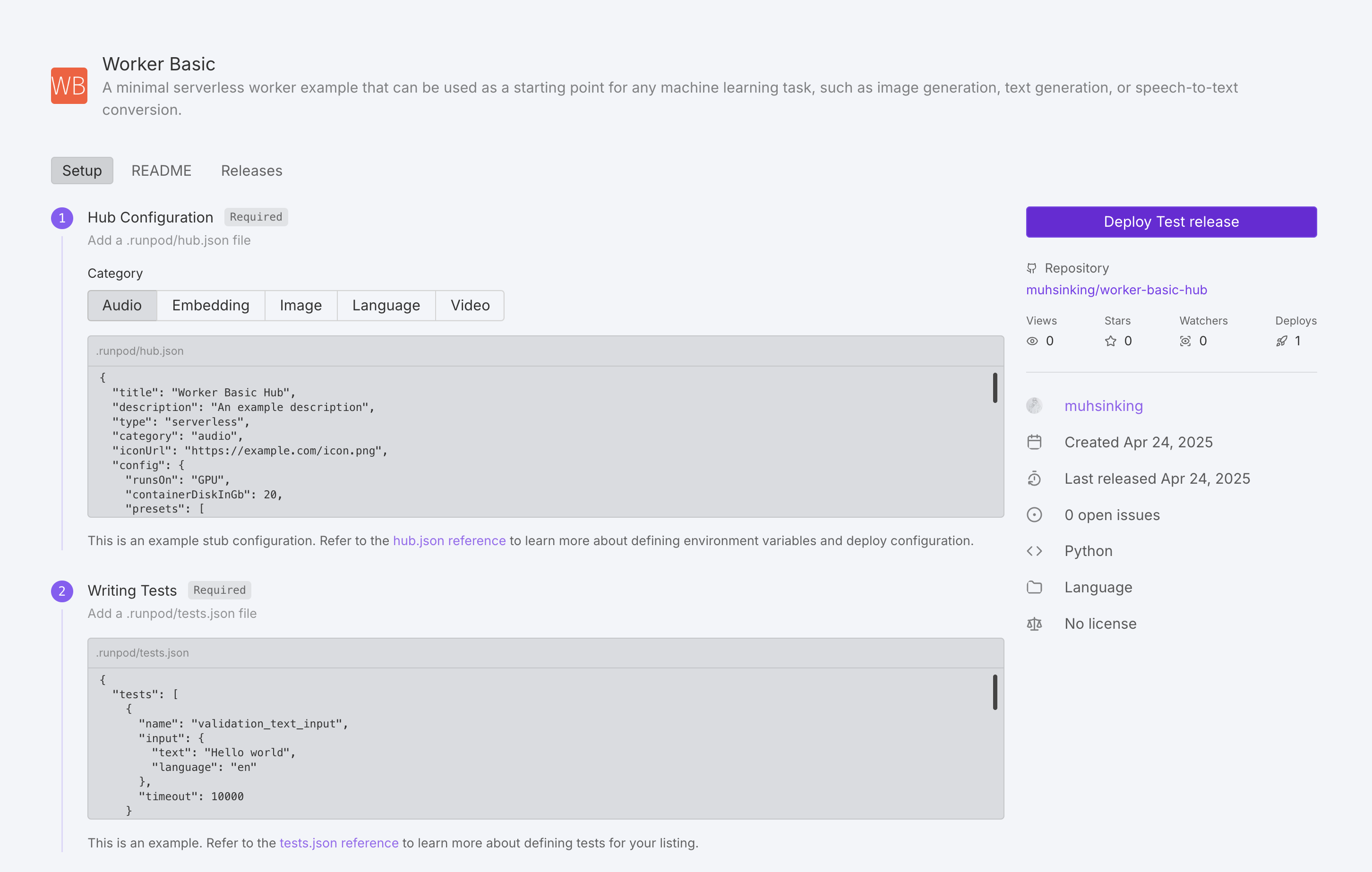 ## How to publish your repo
Follow these steps to add your repository to the Hub:
1. Navigate to the [Hub page](https://www.console.runpod.io/hub) in the Runpod console.
2. Under **Add your repo** click **Get Started**.
3. Enter your GitHub repo URL.
4. Follow the UI steps to add your repo to the Hub.
The Hub page will guide you through the following steps:
1. Create your `hub.json` and `tests.json` files.
2. Ensure your repository contains a `handler.py`, `Dockerfile`, and `README.md` file (in either the `.runpod` or root directory).
3. Create a new GitHub release (the Hub indexes releases, not commits).
4. (Optional) Add a Runpod Hub badge into your GitHub `README.md` file, so that users can instantly deploy your repo from GitHub.
After all the necessary files are in place and a release has been created, your repo will be marked "Pending" during building/testing. After testing is complete, the Runpod team will manually review the repo for publication.
## Update a repo
To update your repo on the Hub, just **create a new GitHub release**, and the Hub listing will be automatically indexed and built (usually within an hour).
## Required files
Aside from a working [Serverless implementation](/serverless/overview), every Hub repo requires two additional configuration files:
1. `hub.json` - Defines metadata and deployment settings for your repo.
2. `tests.json` - Specifies how to test your repo.
These files should be placed in the `.runpod` directory at the root of your repository. This directory takes precedence over the root directory, allowing you to override common files like `Dockerfile` and `README.md` specifically for the Hub.
## hub.json reference
The `hub.json` file defines how your listing appears and functions in the Hub.
You can build your `hub.json` from scratch, or use [this template](#hubjson-template) as a starting point.
### General metadata
| Field | Description | Required | Values |
| ------------- | ---------------------------------- | -------- | --------------------------------------------------------------- |
| `title` | Name of your tool | Yes | String |
| `description` | Brief explanation of functionality | Yes | String |
| `type` | Deployment type | Yes | `"serverless"` |
| `category` | Tool category | Yes | `"audio"`, `"embedding"`, `"language"`, `"video"`, or `"image"` |
| `iconUrl` | URL to tool icon | No | Valid URL |
| `config` | Runpod configuration | Yes | Object ([see below](#runpod-configuration)) |
### Runpod configuration
| Field | Description | Required | Values |
| --------------------- | ----------------------------------------------------------------------------------------------------------------------------------------- | --------------------------- | ---------------------------------------------------------------------------------------------------------------------------------------------------------------------------------------------------- |
| `runsOn` | Machine type | Yes | `"GPU"` or `"CPU"` |
| `endpointType` | Endpoint deployment type. When set to `"LB"`, users can deploy your listing as a Serverless endpoint or a Pod directly from the Hub page. | No | `"LB"` |
| `containerDiskInGb` | Container disk space allocation | Yes | Integer (GB) |
| `cpuFlavor` | CPU configuration | Only if `runsOn` is `"CPU"` | Valid CPU flavor string. For a complete list of available CPU flavors, see [CPU types](/references/cpu-types) |
| `gpuCount` | Number of GPUs | Only if `runsOn` is `"GPU"` | Integer |
| `gpuIds` | GPU pool specification | Only if `runsOn` is `"GPU"` | Comma-separated pool IDs (e.g., `"ADA_24"`) with optional GPU ID negations (e.g., `"-NVIDIA GeForce RTX 4090"`). For a list of GPU pools and IDs, see [GPU types](/references/gpu-types#gpu-pools). |
| `allowedCudaVersions` | Supported CUDA versions | No | Array of version strings |
| `env` | Environment variable definitions | No | Object ([see below](#environment-variables)) |
| `presets` | Default environment variable values | No | Object ([see below](#presets)) |
### Environment variables
Environment variables can be defined in several ways:
1. **Static variables**: Direct value assignment. For example:
```json theme={"theme":{"light":"github-light","dark":"github-dark"}}
{
"key": "API_KEY",
"value": "default-api-key-value"
}
```
2. **String inputs**: User-entered text fields. For example:
```json theme={"theme":{"light":"github-light","dark":"github-dark"}}
{
"key": "MODEL_PATH",
"input": {
"name": "Model path",
"type": "string",
"description": "Path to the model weights on disk",
"default": "/models/stable-diffusion-v1-5",
"advanced": false
}
}
```
3. **Hugging Face inputs:** Fields for model selection from Hugging Face Hub. For example:
```json theme={"theme":{"light":"github-light","dark":"github-dark"}}
{
"key": "HF_MODEL",
"input": {
"type": "huggingface",
"name": "Hugging Face Model",
"description": "Model organization/name as listed on Huggingface Hub",
"default": "runwayml/stable-diffusion-v1-5",
"required": true
}
}
```
4. **Option inputs**: User selected option fields. For example:
```json theme={"theme":{"light":"github-light","dark":"github-dark"}}
{
"key": "PRECISION",
"input": {
"name": "Model precision",
"type": "string",
"description": "The numerical precision for model inference",
"options": [
{"label": "Full Precision (FP32)", "value": "fp32"},
{"label": "Half Precision (FP16)", "value": "fp16"},
{"label": "8-bit Quantization", "value": "int8"}
],
"default": "fp16"
}
}
```
5. **Number Inputs**: User-entered numeric fields. For example:
```json theme={"theme":{"light":"github-light","dark":"github-dark"}}
{
"key": "MAX_TOKENS",
"input": {
"name": "Maximum tokens",
"type": "number",
"description": "Maximum number of tokens to generate",
"min": 32,
"max": 4096,
"default": 1024
}
}
```
6. **Boolean Inputs**: User-toggled boolean fields. For example:
```json theme={"theme":{"light":"github-light","dark":"github-dark"}}
{
"key": "USE_FLASH_ATTENTION",
"input": {
"type": "boolean",
"name": "Flash attention",
"description": "Enable Flash Attention for faster inference on supported GPUs",
"default": true,
"trueValue": "true",
"falseValue": "false"
}
}
```
Advanced options will be hidden by default. Hide an option by setting: `"advanced": true` .
### Presets
Presets allow you to define groups of default environment variable values. When a user deploys your repo, they'll be offered a dropdown menu with any preset options you've defined.
Here are some example presets:
```json theme={"theme":{"light":"github-light","dark":"github-dark"}}
"presets": [
{
"name": "Quality Optimized",
"defaults": {
"MODEL_NAME": "runpod-stable-diffusion-xl",
"INFERENCE_MODE": "quality",
"BATCH_SIZE": 1,
"ENABLE_CACHING": false,
"USE_FLASH_ATTENTION": true
}
},
{
"name": "Performance Optimized",
"defaults": {
"MODEL_NAME": "runpod-stable-diffusion-v1-5",
"INFERENCE_MODE": "fast",
"BATCH_SIZE": 8,
"ENABLE_CACHING": true,
"USE_FLASH_ATTENTION": true
}
}
]
```
## hub.json template
Here’s an example `hub.json` file that you can use as a starting point:
```json title="hub.json" theme={"theme":{"light":"github-light","dark":"github-dark"}}
{
"title": "Your Tool's Name",
"description": "A brief explanation of what your tool does",
"type": "serverless",
"category": "language",
"iconUrl": "https://your-icon-url.com/icon.png",
"config": {
"runsOn": "GPU",
"containerDiskInGb": 20,
"gpuCount": 1,
"gpuIds": "RTX A4000,-NVIDIA GeForce RTX 4090",
"allowedCudaVersions": [
"12.8", "12.7", "12.6", "12.5", "12.4",
"12.3", "12.2", "12.1", "12.0"
],
"presets": [
{
"name": "Preset Name",
"defaults": {
"STRING_ENV_VAR": "value1",
"INT_ENV_VAR": 10,
"BOOL_ENV_VAR": true
}
}
],
"env": [
{
"key": "STATIC_ENV_VAR",
"value": "static_value"
},
{
"key": "STRING_ENV_VAR",
"input": {
"name": "User-friendly Name",
"type": "string",
"description": "Description of this input",
"default": "default value",
"advanced": false
}
},
{
"key": "OPTION_ENV_VAR",
"input": {
"name": "Select Option",
"type": "string",
"description": "Choose from available options",
"options": [
{"label": "Option 1", "value": "value1"},
{"label": "Option 2", "value": "value2"}
],
"default": "value1"
}
},
{
"key": "INT_ENV_VAR",
"input": {
"name": "Numeric Value",
"type": "number",
"description": "Enter a number",
"min": 1,
"max": 100,
"default": 50
}
},
{
"key": "BOOL_ENV_VAR",
"input": {
"type": "boolean",
"name": "Enable Feature",
"description": "Toggle this feature on/off",
"default": false,
"trueValue": "enabled",
"falseValue": "disabled"
}
}
]
}
}
```
## tests.json reference
The `tests.json` file defines test cases to validate your tool's functionality. Tests are executed during the build step after [a release has been created](#publish-your-repo-to-the-runpod-hub). A test is considered valid by the Hub if the endpoint returns a [200 response](https://developer.mozilla.org/en-US/docs/Web/HTTP/Reference/Status/200).
You can build your `tests.json` from scratch, or use [this template](#testsjson-template) as a starting point.
### Test cases
Each test case should include:
| Field | Description | Required | Values |
| --------- | --------------------- | -------- | ---------------------- |
| `name` | Test identifier | Yes | String |
| `input` | Raw job input payload | Yes | Object |
| `timeout` | Max execution time | No | Integer (milliseconds) |
### Test environment configuration
| Field | Description | Required | Values |
| --------------------- | ----------------------------- | ------------------ | ---------------------------------------------------------------- |
| `gpuTypeId` | GPU type for testing | Only for GPU tests | Valid GPU ID (see [GPU types](/references/gpu-types)) |
| `gpuCount` | Number of GPUs | Only for GPU tests | Integer |
| `cpuFlavor` | CPU configuration for testing | Only for CPU tests | Valid CPU flavor string (see [CPU types](/references/cpu-types)) |
| `env` | Test environment variables | No | Array of key-value pairs |
| `allowedCudaVersions` | Supported CUDA versions | No | Array of version strings |
## tests.json template
Here’s an example `tests.json` file that you can use as a starting point:
```json title="tests.json" theme={"theme":{"light":"github-light","dark":"github-dark"}}
{
"tests": [
{
"name": "test_case_name",
"input": {
"param1": "value1",
"param2": "value2"
},
"timeout": 10000
}
],
"config": {
"gpuTypeId": "NVIDIA GeForce RTX 4090",
"gpuCount": 1,
"env": [
{
"key": "TEST_ENV_VAR",
"value": "test_value"
}
],
"allowedCudaVersions": [
"12.7", "12.6", "12.5", "12.4",
"12.3", "12.2", "12.1", "12.0", "11.7"
]
}
}
```
## How to publish your repo
Follow these steps to add your repository to the Hub:
1. Navigate to the [Hub page](https://www.console.runpod.io/hub) in the Runpod console.
2. Under **Add your repo** click **Get Started**.
3. Enter your GitHub repo URL.
4. Follow the UI steps to add your repo to the Hub.
The Hub page will guide you through the following steps:
1. Create your `hub.json` and `tests.json` files.
2. Ensure your repository contains a `handler.py`, `Dockerfile`, and `README.md` file (in either the `.runpod` or root directory).
3. Create a new GitHub release (the Hub indexes releases, not commits).
4. (Optional) Add a Runpod Hub badge into your GitHub `README.md` file, so that users can instantly deploy your repo from GitHub.
After all the necessary files are in place and a release has been created, your repo will be marked "Pending" during building/testing. After testing is complete, the Runpod team will manually review the repo for publication.
## Update a repo
To update your repo on the Hub, just **create a new GitHub release**, and the Hub listing will be automatically indexed and built (usually within an hour).
## Required files
Aside from a working [Serverless implementation](/serverless/overview), every Hub repo requires two additional configuration files:
1. `hub.json` - Defines metadata and deployment settings for your repo.
2. `tests.json` - Specifies how to test your repo.
These files should be placed in the `.runpod` directory at the root of your repository. This directory takes precedence over the root directory, allowing you to override common files like `Dockerfile` and `README.md` specifically for the Hub.
## hub.json reference
The `hub.json` file defines how your listing appears and functions in the Hub.
You can build your `hub.json` from scratch, or use [this template](#hubjson-template) as a starting point.
### General metadata
| Field | Description | Required | Values |
| ------------- | ---------------------------------- | -------- | --------------------------------------------------------------- |
| `title` | Name of your tool | Yes | String |
| `description` | Brief explanation of functionality | Yes | String |
| `type` | Deployment type | Yes | `"serverless"` |
| `category` | Tool category | Yes | `"audio"`, `"embedding"`, `"language"`, `"video"`, or `"image"` |
| `iconUrl` | URL to tool icon | No | Valid URL |
| `config` | Runpod configuration | Yes | Object ([see below](#runpod-configuration)) |
### Runpod configuration
| Field | Description | Required | Values |
| --------------------- | ----------------------------------------------------------------------------------------------------------------------------------------- | --------------------------- | ---------------------------------------------------------------------------------------------------------------------------------------------------------------------------------------------------- |
| `runsOn` | Machine type | Yes | `"GPU"` or `"CPU"` |
| `endpointType` | Endpoint deployment type. When set to `"LB"`, users can deploy your listing as a Serverless endpoint or a Pod directly from the Hub page. | No | `"LB"` |
| `containerDiskInGb` | Container disk space allocation | Yes | Integer (GB) |
| `cpuFlavor` | CPU configuration | Only if `runsOn` is `"CPU"` | Valid CPU flavor string. For a complete list of available CPU flavors, see [CPU types](/references/cpu-types) |
| `gpuCount` | Number of GPUs | Only if `runsOn` is `"GPU"` | Integer |
| `gpuIds` | GPU pool specification | Only if `runsOn` is `"GPU"` | Comma-separated pool IDs (e.g., `"ADA_24"`) with optional GPU ID negations (e.g., `"-NVIDIA GeForce RTX 4090"`). For a list of GPU pools and IDs, see [GPU types](/references/gpu-types#gpu-pools). |
| `allowedCudaVersions` | Supported CUDA versions | No | Array of version strings |
| `env` | Environment variable definitions | No | Object ([see below](#environment-variables)) |
| `presets` | Default environment variable values | No | Object ([see below](#presets)) |
### Environment variables
Environment variables can be defined in several ways:
1. **Static variables**: Direct value assignment. For example:
```json theme={"theme":{"light":"github-light","dark":"github-dark"}}
{
"key": "API_KEY",
"value": "default-api-key-value"
}
```
2. **String inputs**: User-entered text fields. For example:
```json theme={"theme":{"light":"github-light","dark":"github-dark"}}
{
"key": "MODEL_PATH",
"input": {
"name": "Model path",
"type": "string",
"description": "Path to the model weights on disk",
"default": "/models/stable-diffusion-v1-5",
"advanced": false
}
}
```
3. **Hugging Face inputs:** Fields for model selection from Hugging Face Hub. For example:
```json theme={"theme":{"light":"github-light","dark":"github-dark"}}
{
"key": "HF_MODEL",
"input": {
"type": "huggingface",
"name": "Hugging Face Model",
"description": "Model organization/name as listed on Huggingface Hub",
"default": "runwayml/stable-diffusion-v1-5",
"required": true
}
}
```
4. **Option inputs**: User selected option fields. For example:
```json theme={"theme":{"light":"github-light","dark":"github-dark"}}
{
"key": "PRECISION",
"input": {
"name": "Model precision",
"type": "string",
"description": "The numerical precision for model inference",
"options": [
{"label": "Full Precision (FP32)", "value": "fp32"},
{"label": "Half Precision (FP16)", "value": "fp16"},
{"label": "8-bit Quantization", "value": "int8"}
],
"default": "fp16"
}
}
```
5. **Number Inputs**: User-entered numeric fields. For example:
```json theme={"theme":{"light":"github-light","dark":"github-dark"}}
{
"key": "MAX_TOKENS",
"input": {
"name": "Maximum tokens",
"type": "number",
"description": "Maximum number of tokens to generate",
"min": 32,
"max": 4096,
"default": 1024
}
}
```
6. **Boolean Inputs**: User-toggled boolean fields. For example:
```json theme={"theme":{"light":"github-light","dark":"github-dark"}}
{
"key": "USE_FLASH_ATTENTION",
"input": {
"type": "boolean",
"name": "Flash attention",
"description": "Enable Flash Attention for faster inference on supported GPUs",
"default": true,
"trueValue": "true",
"falseValue": "false"
}
}
```
Advanced options will be hidden by default. Hide an option by setting: `"advanced": true` .
### Presets
Presets allow you to define groups of default environment variable values. When a user deploys your repo, they'll be offered a dropdown menu with any preset options you've defined.
Here are some example presets:
```json theme={"theme":{"light":"github-light","dark":"github-dark"}}
"presets": [
{
"name": "Quality Optimized",
"defaults": {
"MODEL_NAME": "runpod-stable-diffusion-xl",
"INFERENCE_MODE": "quality",
"BATCH_SIZE": 1,
"ENABLE_CACHING": false,
"USE_FLASH_ATTENTION": true
}
},
{
"name": "Performance Optimized",
"defaults": {
"MODEL_NAME": "runpod-stable-diffusion-v1-5",
"INFERENCE_MODE": "fast",
"BATCH_SIZE": 8,
"ENABLE_CACHING": true,
"USE_FLASH_ATTENTION": true
}
}
]
```
## hub.json template
Here’s an example `hub.json` file that you can use as a starting point:
```json title="hub.json" theme={"theme":{"light":"github-light","dark":"github-dark"}}
{
"title": "Your Tool's Name",
"description": "A brief explanation of what your tool does",
"type": "serverless",
"category": "language",
"iconUrl": "https://your-icon-url.com/icon.png",
"config": {
"runsOn": "GPU",
"containerDiskInGb": 20,
"gpuCount": 1,
"gpuIds": "RTX A4000,-NVIDIA GeForce RTX 4090",
"allowedCudaVersions": [
"12.8", "12.7", "12.6", "12.5", "12.4",
"12.3", "12.2", "12.1", "12.0"
],
"presets": [
{
"name": "Preset Name",
"defaults": {
"STRING_ENV_VAR": "value1",
"INT_ENV_VAR": 10,
"BOOL_ENV_VAR": true
}
}
],
"env": [
{
"key": "STATIC_ENV_VAR",
"value": "static_value"
},
{
"key": "STRING_ENV_VAR",
"input": {
"name": "User-friendly Name",
"type": "string",
"description": "Description of this input",
"default": "default value",
"advanced": false
}
},
{
"key": "OPTION_ENV_VAR",
"input": {
"name": "Select Option",
"type": "string",
"description": "Choose from available options",
"options": [
{"label": "Option 1", "value": "value1"},
{"label": "Option 2", "value": "value2"}
],
"default": "value1"
}
},
{
"key": "INT_ENV_VAR",
"input": {
"name": "Numeric Value",
"type": "number",
"description": "Enter a number",
"min": 1,
"max": 100,
"default": 50
}
},
{
"key": "BOOL_ENV_VAR",
"input": {
"type": "boolean",
"name": "Enable Feature",
"description": "Toggle this feature on/off",
"default": false,
"trueValue": "enabled",
"falseValue": "disabled"
}
}
]
}
}
```
## tests.json reference
The `tests.json` file defines test cases to validate your tool's functionality. Tests are executed during the build step after [a release has been created](#publish-your-repo-to-the-runpod-hub). A test is considered valid by the Hub if the endpoint returns a [200 response](https://developer.mozilla.org/en-US/docs/Web/HTTP/Reference/Status/200).
You can build your `tests.json` from scratch, or use [this template](#testsjson-template) as a starting point.
### Test cases
Each test case should include:
| Field | Description | Required | Values |
| --------- | --------------------- | -------- | ---------------------- |
| `name` | Test identifier | Yes | String |
| `input` | Raw job input payload | Yes | Object |
| `timeout` | Max execution time | No | Integer (milliseconds) |
### Test environment configuration
| Field | Description | Required | Values |
| --------------------- | ----------------------------- | ------------------ | ---------------------------------------------------------------- |
| `gpuTypeId` | GPU type for testing | Only for GPU tests | Valid GPU ID (see [GPU types](/references/gpu-types)) |
| `gpuCount` | Number of GPUs | Only for GPU tests | Integer |
| `cpuFlavor` | CPU configuration for testing | Only for CPU tests | Valid CPU flavor string (see [CPU types](/references/cpu-types)) |
| `env` | Test environment variables | No | Array of key-value pairs |
| `allowedCudaVersions` | Supported CUDA versions | No | Array of version strings |
## tests.json template
Here’s an example `tests.json` file that you can use as a starting point:
```json title="tests.json" theme={"theme":{"light":"github-light","dark":"github-dark"}}
{
"tests": [
{
"name": "test_case_name",
"input": {
"param1": "value1",
"param2": "value2"
},
"timeout": 10000
}
],
"config": {
"gpuTypeId": "NVIDIA GeForce RTX 4090",
"gpuCount": 1,
"env": [
{
"key": "TEST_ENV_VAR",
"value": "test_value"
}
],
"allowedCudaVersions": [
"12.7", "12.6", "12.5", "12.4",
"12.3", "12.2", "12.1", "12.0", "11.7"
]
}
}
```